
Reflecting on Our Success in Building the Least Successful Million-Dollar Company
Our SaaS start-up turns 10 years old today! Here are my reflections on what we got right and what we got wrong whilst building Outseta over the past decade.

Most folks reading this post will recognize that the title is a play on Sahil Lavingia’s famous article Reflecting on My Failure to Build a Billion-Dollar Company.
Perhaps the play on words got you here—excellent. I hope to keep you here with something that’s genuinely rare these days; my reflections after spending a decade building our start-up, Outseta.
It was 10 years ago today—October 16, 2016—that my Co-founders and I got together in one of our living rooms in Boston and started working on Outseta. We started by looking at the best tools for payments, authentication, CRM, email, and customer support that were on the market at the time, and we wondered “what if we brought the most critical parts of each together into a single platform?” The goal was to make it oh-so-much easier to launch a subscription business—”Shopify for SaaS” was very much the genesis.
This date has loomed over me for the past six months. Ten years feels like a milestone that demands some breathtaking wisdom, and I’d planned to spend months polishing a post full of it. Instead, I didn’t write a word until 11:39am yesterday.
What follows is written as directly and from the heart as possible. It’s been equal parts therapeutic and maddening to write. My hope is simply that this post is a small contribution to the start-up world that’s honest.
Has Outseta been successful?
Back to the title. I have to start here, because the more specific reflections that follow all fall out of this framing. Once I grapple with that topic, the remainder of the post follows the highly original structure of:
- What we got right
- What we got wrong
But first the question of our success. Success is of course in the eye of the beholder—yes, even in the world of business.
How Outseta has been a failure
As opposed to Sahil, we never set out to build a billion dollar company. That seems to me to be a rather silly objective—but I certainly did set out to build something that’s had more financial success than Outseta has had so far.
I don’t see Outseta as a success from a financial perspective. If I could go back to my 10-years-younger self and say, “This is where you’ll be in 10 years,” would I sign up to do it again?
The truth is the answer is somewhere in the range of “Meh?” to “Probably not.” That may sound harsh, but it’s true.
I say this knowing very well that in the world of bootstrapped SaaS start-ups and indie hackers in which we operate, Outseta has had the type of success that most of us are looking for. It’s a 7-figure business that’s profitable and employs a small team. Our team owns 100% of the business, and we control our own destiny. Many of the internet’s top creators—people like Justin Welsh, Chris Do, Rob Hope, and Jay Acunzo have built businesses and products with Outseta. The business has had real staying power.
I acknowledge all that, and in spite of my frustrations there’s still a large part of me that’s proud. I know that starting a business is hard; I see it every day in our customers’ businesses. We’ve been dogged in building Outseta—we’ve “left it all out on the field,” and that feels good.
But we’ve put an enormous amount of talent and effort into the business over 10+ years, and for as hard as we’ve squeezed the orange we certainly were hoping for more juice. The effort to reward ratio you hope for when starting a company isn’t what you’d want.
I’ve spent 10 years in the prime of my career on this; many other routes would have delivered far more in the way of financial rewards. I’m not complaining—this was a very deliberate choice—but it’s the reality of how I view the business in terms of its financial success.
How Outseta has been a success
On a personal level (and for our team), Outseta has given me enormous freedom to do the things that I want to do with my life. I’ve lived all over the world. My kids have done more cool stuff in their 7 years of life than most adults. I’ve never missed a significant event in their lives because of work. I have near complete control of my day-to-day schedule.
I don’t take any of that lightly—I certainly work-to-live more than I live-to-work. I think it’s fair to say that I’ve gotten out of the business the primary thing I wanted to get out of it. I don’t mean that to sound like a cope; I mean it.
Outseta has been absolutely, 100% worth it on this dimension.
But am I frustrated by the reality that Outseta has delivered life profits, but not (yet) the financial profits I hoped it would for both myself and the team? You bet. Wanting both things is OK—that’s why you become a Founder!
I am immensely grateful for what Outseta has enabled me to do. But I’m still hungry.
What we got right
With all of that as preamble to what follows, here’s what I see as our successes and failures when I look back.
Team
I feel overwhelmingly positive about and appreciative of the team we built. My Co-founders (Dave and Dimitris) and I had significant experience working together prior to Outseta. We had very complementary skills. And we had a ton of philosophical alignment in terms of what we wanted to get out of Outseta and how we wanted to run the business.
The truth is we never had it easy—it took us about 3 years to get to $1,500 in MRR!—and we all have quite different personal circumstances, too. These are the types of struggles and differences that often rip Co-founding teams apart. Yet through all of our struggles, there’s never been an ounce of Co-founder drama. There’s been plenty of debate, but it was always in the spirit of the best interests of the business.
Beyond our Co-founding team, we did damn well on our early hires, too. We hired James to lead design—he’s been with us nearly 9 years now. The product UI and brand that you see is pretty much all James. Bernard came next in engineering—he’s been with us 5.5 years now, and he’s more responsible for the product that you see today than anyone except for Dave.
I’d add that I’d give our team a pretty lousy score when it comes to high-fiving each other and chatting at the proverbial watercooler. We’re not doing virtual happy hours and escape rooms. Part of this is personalities, but part of this is also just that the work has been a grind; making the business “work” has always been the priority out of necessity.
Culture comes easy when growth is good.
On the other hand, I give our team top marks in that everyone is talented, pleasant, consistent, and their commitment has been steadfast. We wanted to build a team where people act like owners—and I give us really high marks in this regard. We are no-bullshit and committed to the core.
Organizational Model
The most unique thing about Outseta has always been our organizational design and our "Choose your own adventure” compensation model. If it’s your first time reading about this, we:
- Pay everyone based on a standardized salary of $210,000
- Allow everyone to work 1 to 5 days per week
- Issue equity to everyone on the same terms as the founders
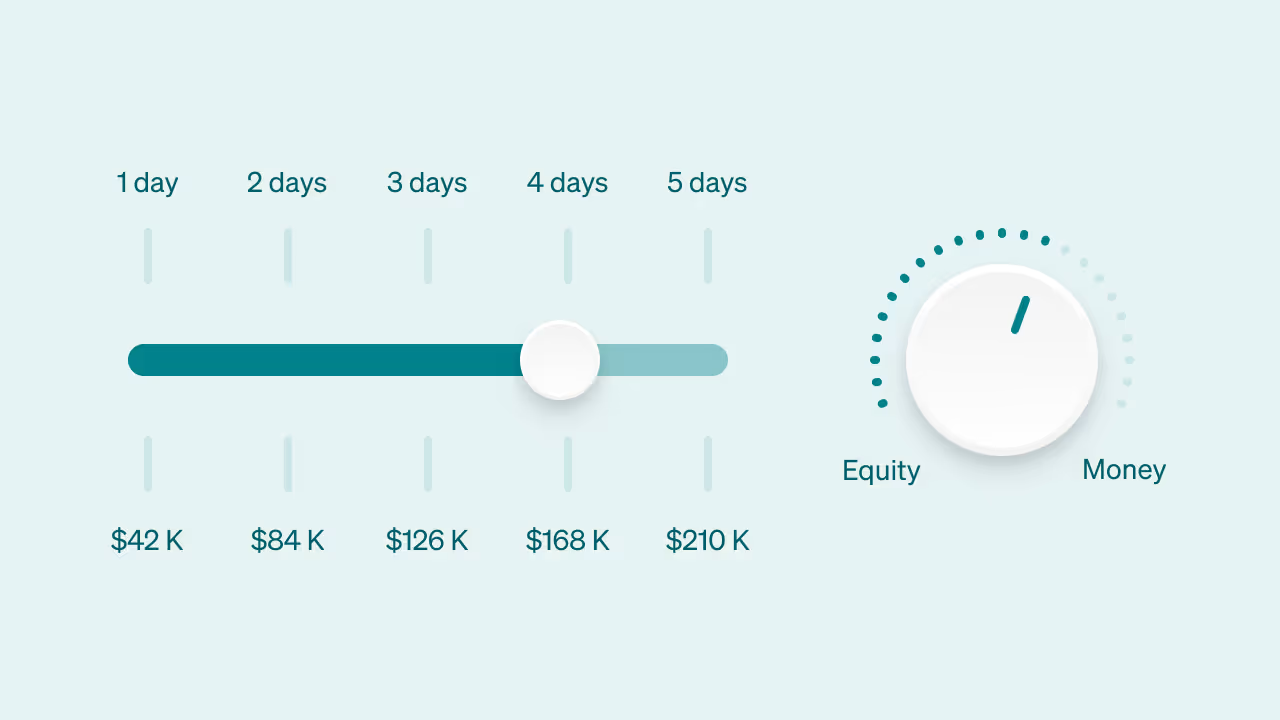
If I had to do it all over again, I’d do it exactly the same way. I don’t think the magic is so much in this model specifically, but it is in planting a flag and letting people select in-or-out based on their desire to work in whatever way you want to.
This model allowed us to attract employees like Bernard in the early days, before we could have ever afforded his salary outright without our equity structure. He now owns nearly 18% of the business. And it provided a very clear and documented path to how we’d grow as the business made more revenue.
Without question, this model makes hiring even more important—I’d argue this is a good thing.
Equity and ownership sound appealing to almost everyone. The trade-offs that come with them appeal to far fewer people. In our model, if you want a raise, you help drive the growth that pays for it. If there’s an uptime issue at 3am, there’s no one else to call. The tedious tasks and the calls nobody wants to take don’t get handed off to someone else—they’re yours.
That’s not a knock on anyone who doesn’t want that—I’d argue most people don’t, but that’s the deal that comes with ownership. And over 10+ years you’ll hit some hard stretches, so you need people who will dig in when things get tough.
Our operating model was always designed to help people self-select into (or out of) that deal, and I think it’s done that pretty darn effectively.
If anything, my biggest complaint is the number of talented people who have expressed interest in working with us that we haven’t been able to hire, because we haven’t had greater financial success. I will regret not being able to hire some of these people for as long as I live.
It’s also worth noting that we knew going into Outseta that we were doing something out-of-the-ordinary in operating this way. We spent a ton of time, before we had any real business or revenue, documenting all of this stuff.
One of the earliest things that we published was our operating agreement—and there was no shortage of people who poked fun at us for doing so before we had any real business. Just this past year—nearly 10 years later—we’ve found ourselves leaning on this document in some areas for the first time. We’re profit sharing and buying back equity from a departed employee for the first time this year; the model for which we defined all those years ago. Thinking about this stuff early on has consistently proved to be worthwhile.
I do think you’re going to see organizational models like this become much more common in the coming years, as teams look to stay small, talent dense, and rely on AI that much more.
We chose a “durable” idea
We chose the idea for Outseta for two reasons.
First, we’d lived the problem first hand. And second, we were genuinely looking for an idea to invest 15+ years into.
The idea that we’d work on Outseta for 15 years was met with no shortage of “Yeah, right” eyerolls initially, but sitting here now 10 years later I think it’s safe to say we meant it.
We very much viewed the core things that Outseta does as “durable”—payments, authentication, CRM, emails. The need for that stuff has been around forever, and I continue to think it will be.
An interesting part of this is that 10 years is long enough to have lived through a few different technology waves. We started Outseta selling specifically to developers. Then we got sucked into the world of “no-code,” and now we’re being pulled into the world of building with AI.
How people build has changed; how they’ve implemented payments, and authentication, and emails has changed. But the need for these things has been steadfast; our job as a technology company has been to adapt to the times.
Focus
I definitely applaud our focus.
In my article After Selling for $580M, Here’s What I Learned About SaaS During My Time At Buildium, I wrote about relentless focus and how I thought it had a major impact on Buildium’s success. We took that to heart and carried it through to Outseta.
If you read our launch announcement, what we’ve built is almost exactly what we set out to build.
From the beginning we knew that the size of the product that we were building was ambitious, particularly for a small bootstrapped team. We also knew it was mission critical functionality, and the core features we’d offer were things that just about every subscription business needs.
Once we defined that territory, we stuck to it. Over the last 10 years there were endless shiny things that we could have built. I think we did an incredible job of not getting distracted.
What we got wrong
So we picked a durable idea, got the team right, and generally executed well—yet I’m not jumping up and down over the results. Here’s my read on why that’s the case.
Market
This is the biggest one, by far—we committed the cardinal sin of selling primarily to start-ups. Start-ups by their very definition:
- Don’t have much money
- Go out of business often
It’s worth noting that we absolutely knew that selling to this market would present these challenges—and we chose to do it anyway. We even went to pretty crazy lengths to build Outseta in a way that would allow us to build a viable business despite these challenges. Overall, I think we’ve done a good job given these constraints.
That said, we’ve never been able to outrun this and the business simply hasn’t compounded at the rate that you’d want it to as a result. Outseta has relatively high churn—about 50% of which is simply companies shutting down. On the other hand, the product is enormously sticky and has very low churn when our customers have even very modest financial success—at that point it becomes the operating system on which their entire business runs.
But when 50% of your customers churn due to going out of business, eventually you reach a point where the number of customers you churn each month is equivalent to the number of customers you sign up. Growing beyond that point is very difficult. Somewhere Jason Cohen is smiling.
Outseta continues to grow steadily although unremarkably—we’ll grow revenue by a little over 20% this year. But it’s clear that we’re approaching this point and that we need to do something a bit different to keep growing—that’s a topic for another day and what we’re focused on internally.
The lesson here is clear—the market you’re in dictates your success more than anything.
Great markets come in all different shapes and sizes; everyone looks for large and emerging markets, but small markets with lousy competition can be every bit as good. Sell to buyers that have money. Sell to customers that are stable. Look for markets that by definition are likely to have low churn (think hosting companies).
If there’s a lesson from my entire 16+ year career in start-ups, it’s that an average team in a great market will almost always outperform a great team in a bad market.
Everything you’ve read about the feeling of pushing a boulder uphill versus chasing a boulder that’s rolling downhill—it’s right!
A product you integrate rather than own end-to-end
The challenges of selling to start-ups aside, the other aspect of our business that a lot of our challenges tie back to is that Outseta is a product that you need to buy in addition to (and integrate with) another product.
You don’t use Outseta to actually build your membership website, or your community, or your SaaS product. Instead, we integrate with your website builder of choice or a piece of software that you’ve built with custom code. This allows our customers to build much more “custom” products than our out-of-the-box competitors do, but the audience that’s looking to do that is smaller and comes with a lot of strings attached.
Outseta is tech stack agnostic and has been integrated with just about every website builder, community platform, and tech stack you can imagine at this point. On one hand this makes our addressable market larger—yes. But on the other hand it means that we spend lots of time working with customers through integrations with different tech stacks, all of which have their own nuances.
This creates enormous organizational drag in terms of support, in terms of onboarding, and in terms of tutorials and documentation—even when the implementation process across technologies is quite similar. It also means that “just buying Outseta” doesn’t solve a customer’s problems; Outseta is always implemented alongside (and is therefore somewhat reliant on) other tools that also need to be purchased and configured.
There’s a lot to be said for building SaaS products where you really own the customer’s experience with your product end-to-end. That’s something that I’ll value more highly the next time around.
We were too slow to hire technical support
For 10 years we operated using a model where everyone on our team did customer support. This came from a place of:
- We saw support teams often just being an escalation layer—to the people who were actually able to solve the problem.
- We wanted to keep everyone at Outseta close to the needs of the customer.
- How we operate requires that we keep the team small.
Today everyone at Outseta continues to do support and I continue to think there’s a lot of benefit to that. We’ve built a reputation for competent, human support that we’re all proud of.
That being said, it became increasingly clear as the years wore on that the time all of us were investing in support was coming at the expense of other work. I tried as hard as I could to bear as much of that responsibility as I could, and for me that typically meant that marketing work was what fell by the wayside.
I want to be very clear on the cost of this mistake; we’ve been dramatically underinvested in marketing and that’s been true for the entire life of our business.
I want to add that we knew Outseta would always be a “product first” company in terms of the team, because of the size and scope of what we were building. But hiring someone to own support was the biggest, most obvious opportunity for us to free up more time to invest in marketing.
We experimented with contractors assigning tickets. We built a “chat with AI” feature. But only very recently did we hire someone specifically to own support, who is also very technical.
We’re still in the early innings with this person, but it’s very clear to me that we should have done this sooner. The right person is out there—in our case they actually found us.
Misalignment of financial strategy and scope
One of the things I have really gained an appreciation for and always liked talking about is there’s a million different ways to build a business—but you need to find some harmony between your goals, your timeline, how the project is financed, and the size and scope of what you’re building.
I think Outseta was always a little out-of-whack here.
When we set out to find a durable idea to work on, I vividly remember Dimitris telling me he wanted an idea “big enough to sink our teeth into and hold our interest for 15 years.” I did (and do) understand the sentiment, but in retrospect I think we got this wrong given that we were hellbent on staying small and remaining bootstrapped.
Outseta was just a huge product to try to bootstrap. That meant that our timelines were always going to be extended—yet we were competing in some of the most competitive software markets in the world. Those things just don’t add up well.
We’ve managed to build a reasonable business, but it’s been built on brute force effort, stubbornness, and consistency. If you can avoid growing a business this way, you should.
Generally if your goal is to remain bootstrapped, I think you’re far better off looking for the smallest idea possible and doing it really, really well.
Even as I type that, this is changing now more than ever. I think you’ll see small bootstrapped teams taking on much more ambitious software projects with the help of AI.
But that’s also a theme of this post—when you hang around for 10+ years in the world of tech, even fundamental beliefs start to shift under your feet.
We were too slow in making some critical decisions
Last but not least, I’d say we were slow to make some critical decisions—these are mistakes that mostly rest on my shoulders.
One example is that Outseta was initially built to support a SaaS business—so it was architected in a way where every customer has a single subscription. If they wanted to buy something else, they could then log in to buy additional products as “add-on” products. This is a common architectural pattern, especially for SaaS businesses.
Over the years it became clear that this was limiting for our best customers—many of whom wanted to sell a portfolio of products with a great user experience that didn’t require their customers to log in to buy additional products or services.
The problem was a big one—we had to completely blow up Outseta’s underlying data model and essentially rebuild our payment functionality from scratch to support this.
We really, really wrestled with whether or not to do this for a long time—probably for close to two years. We knew it was going to be an all-hands-on-deck effort. We knew it would come at the expense of other product functionality. We knew it would require maintaining two sets of documentation and having users on two different versions of our product.
All of those things genuinely suck. But I think we knew in our heart-of-hearts that we had to do it.
We did make the decision, we did pull the trigger—but because we lingered on the decision for as long as we did, all of this came to fruition at a time this year when AI had suddenly come in and started upending the software industry.
At a time when our efforts should have been fully focused on the changes in the market, we were kind of caught with our pants down—working through really tough backend changes that demanded our full attention. These are the types of scenarios that folks on Twitter who haven’t built software companies themselves never truly appreciate.
We’re still working through this a bit, but in retrospect I think the lesson is more about the cost of waffling on that decision rather than the actual decision that was made. If we’d made the decision in six months instead of two years—regardless of which option we chose—we’d have put ourselves in a much better position.
Of course you do not know when technology trends and markets will shift to this extent, but my point is mostly that I see very little benefit in the extra time we took making this decision. I think speed of decision making is really important—particularly in small teams. Oftentimes any decision is better than no decision; even when it comes to the big stuff.
What about the next 5 years?
So with all that—phew! That’s been my last 10 years.
The (funniest?!) part is that while my feelings on Outseta’s success are obviously mixed, the one thing I’d have hoped for 10+ years in is that the business would feel like it’s on really solid footing.
In the ways that matter most to our customers, it is. We’re profitable, we’re not beholden to investors, and the product our customers run their businesses on is more capable than it’s ever been. What’s shifted is the ground around us—AI is changing how software gets built and sold, and every small software company is working out what that means. True to the last decade, there’s no time to rest on our laurels.
We have a clearer direction than we’ve had in years and a real thesis on how to grow the business to the next level. The tough architectural changes I mentioned are mostly complete, and our product team is realizing that the speed at which they can ship great software has exploded. I’m psyched to see what we can do.
If I had to sum up my Outseta experience, I’d put it this way:
I love how we’ve built our company, but the financial engine you really need to grow a great company has never been quite there—for all of the reasons this post has discussed. I continue to believe this is solvable, and if we can get there, this company has the potential to be something really special for our small team and customers.
If I could go back and do it all over again, I’d build something different—the same way, with the same people.
So what might my 15-year update hold?
If I’m honest, I don’t have a damn clue. But I’m excited to see how it all shakes out.