Stripe vs PayPal: Which Payment Platform to Use in 2026?
Stripe vs PayPal: We compare fees, features, and developer tools for 2026. See our side-by-side breakdown to find the right payment platform for you.

Stripe vs PayPal. Both are payment processors that handle online transactions, but one saves your business $5,820 annually. The other costs you more every month.
Here's how: Stripe charges 2.9% + $0.30 per sale. PayPal charges 3.49% + $0.49. Make $50,000 monthly? PayPal costs you $485 more each month. That's $5,820 wasted per year.
And there's more. PayPal charges $10-30 every month for subscription features. Stripe gives you the same features free.
But PayPal has something valuable. 430 million people already have PayPal accounts and trust it. Offering PayPal increases completed purchases by 54%. That's worth real money.
Stripe is different. You get better tools for developers, over 100 ways to accept payments like Apple Pay and Google Pay, and full control over your checkout page. Stripe Payment Links require zero coding skills.
So which is better? Process high volumes? Stripe saves you thousands. Want customers to trust you instantly with zero setup? Choose PayPal. Running a subscription business? Stripe is your only real option.
This guide breaks down costs, subscription features, setup speed, payment choices, security, and global payments. You'll know which platform works for your business and exactly what you'll pay.
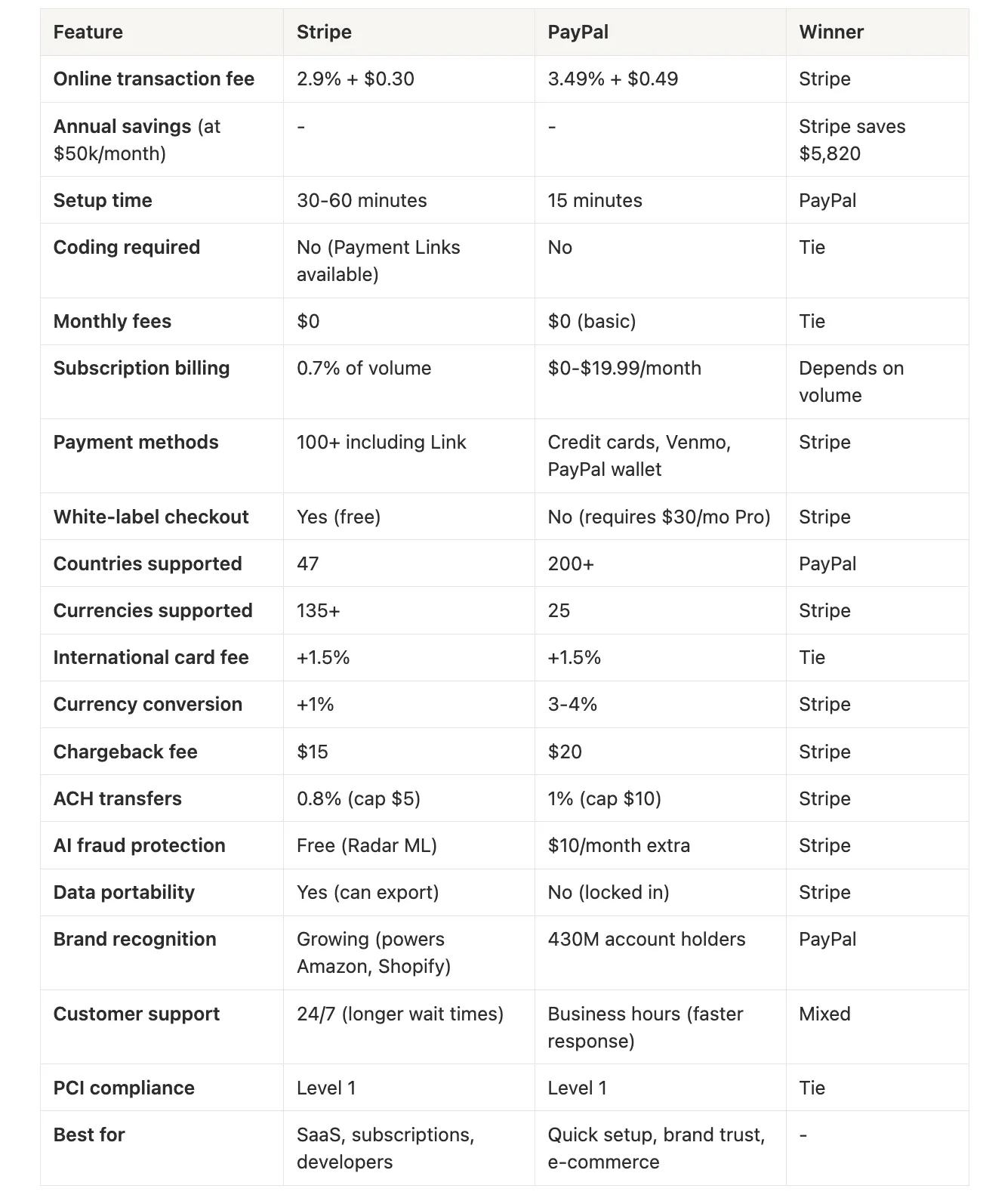
Stripe vs PayPal: At a Glance
What Are Stripe and PayPal?
Both Stripe and PayPal process payments online, but they're built for different business needs.
What is Stripe?
Stripe launched in 2010 and operates in 47 countries supporting 135+ currencies. It's designed as a developer-first payment infrastructure.
The platform handles credit card processing, fraud detection, subscriptions, and invoicing through customizable APIs. There are no monthly fees. Tools like Payment Links make it usable without coding, though developers love it for deep customization.
Major users include Amazon, Shopify, and Google.
What is PayPal?
PayPal started in 1998 and operates in 200+ countries supporting 25 currencies for holding balances. It's designed as a consumer-trusted payment brand.
The platform handles credit card processing, buyer protection, and financing through PayPal Credit. There are no monthly fees for basic business accounts. Setup takes minutes and requires zero technical knowledge.
PayPal owns Venmo (90 million U.S. users) and has 430 million account holders worldwide.
The Core Difference
Stripe is white-label, meaning your customers never leave your site or even know Stripe is processing the payment. Everything stays under your brand.
PayPal is branded. Customers usually redirect to PayPal pages or see PayPal pop-ups, which adds trust through instant brand recognition.
Choose Stripe for lower fees and complete brand control. Choose PayPal for instant customer trust and faster setup.
Stripe vs PayPal: Transaction Fees Compared
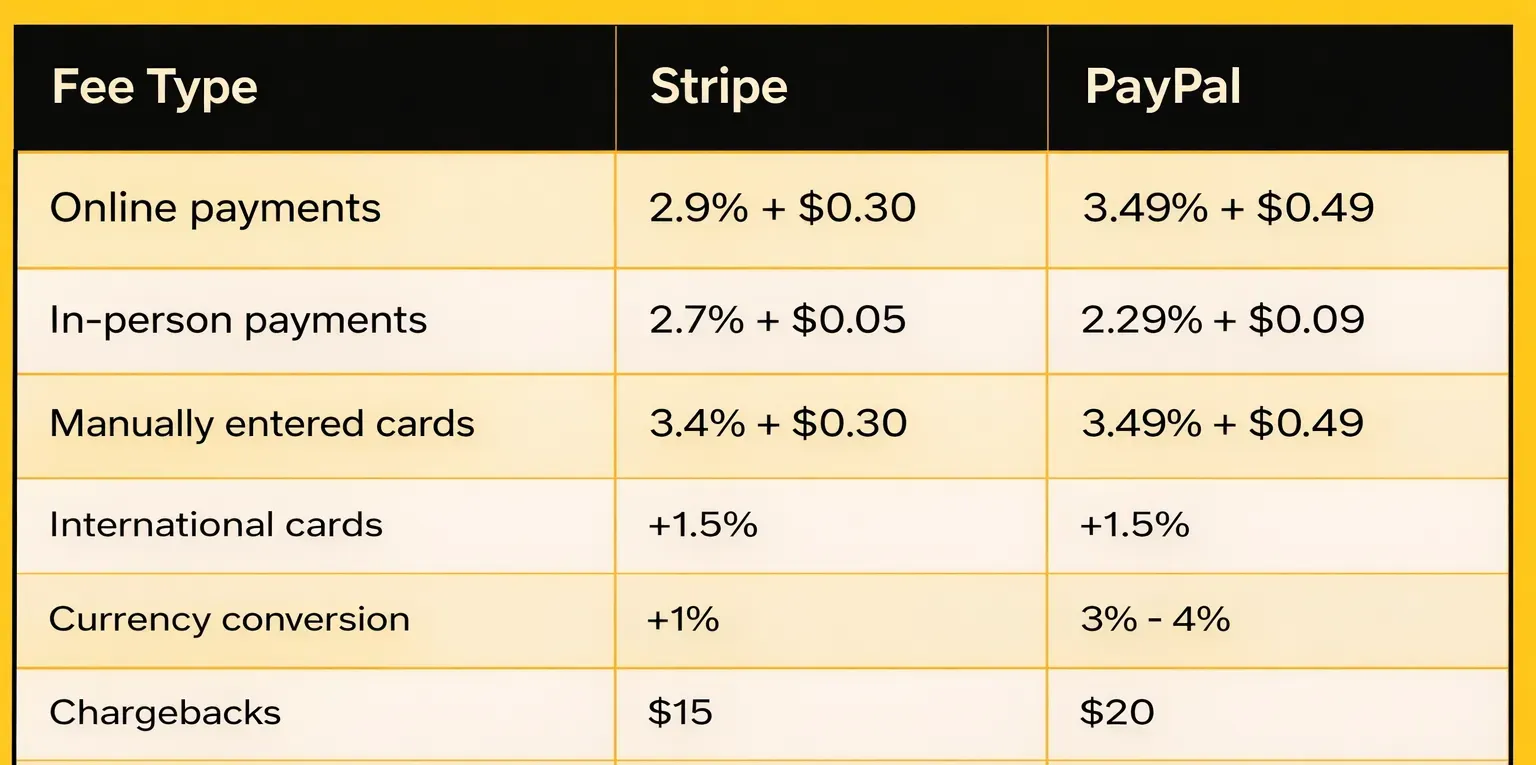
The fee difference between Stripe vs PayPal adds up fast. Here's exactly what you'll pay with each platform in 2026.
Standard Transaction Fees
Real Cost at Different Volumes
Assuming a $50 average order value on domestic transactions:
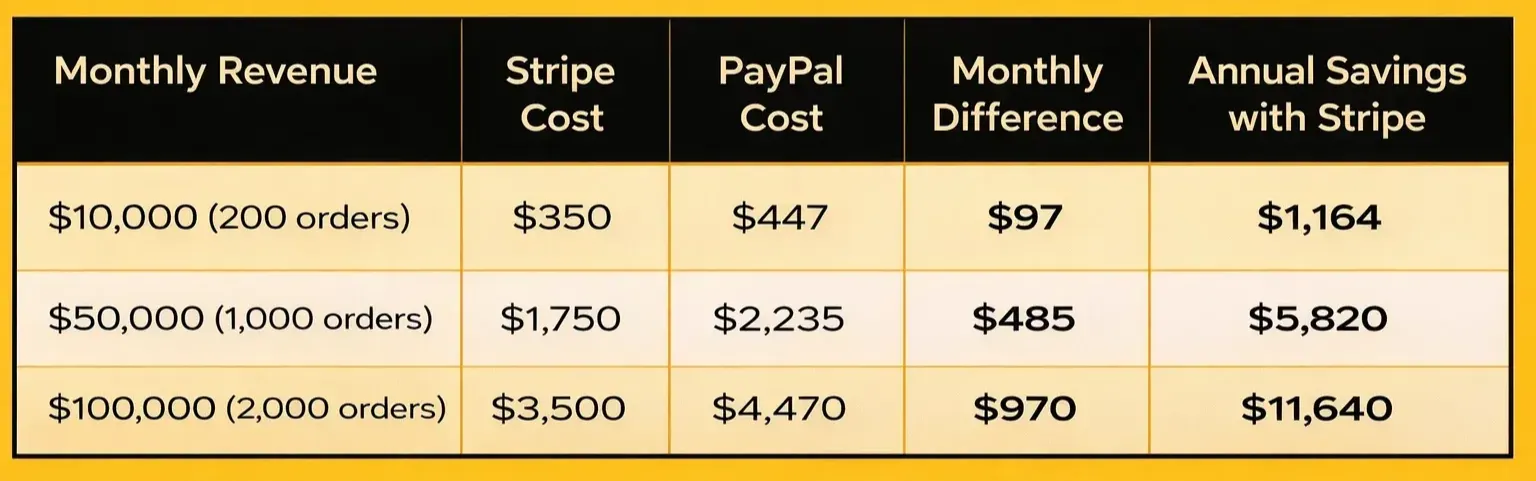
Process $100,000 monthly and Stripe saves you over $11,000 per year. That's significant capital you can reinvest into growth or product development.
How Average Order Value Affects Costs
The fixed fee difference ($0.30 vs $0.49) impacts your costs significantly, especially for low-ticket products:
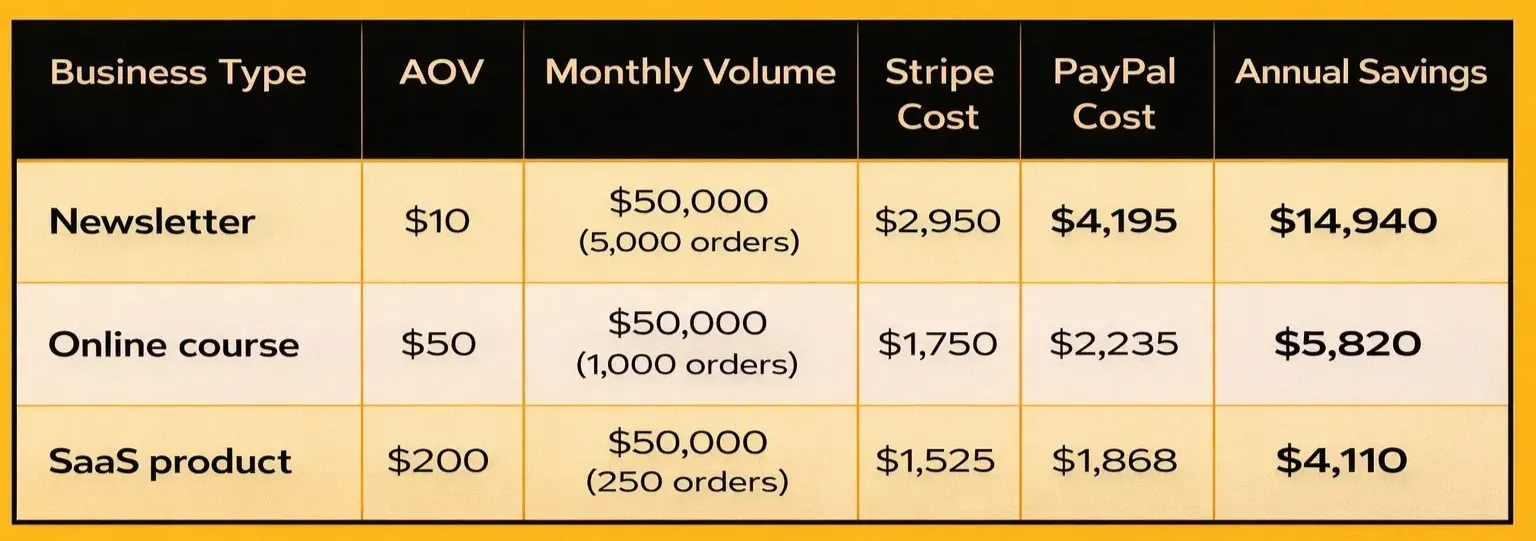
The takeaway: High-volume, low-price businesses like $10 subscriptions get hit hardest by PayPal's $0.49 fixed fee. That extra $0.19 per transaction quietly eats your margins at scale.
Subscription Billing Costs
For recurring revenue businesses, the underlying billing logic carries its own costs.
PayPal charges monthly fees for advanced recurring features. Legacy plans like Enhanced Recurring Payments cost $19.99/month, though basic subscriptions are available for $0/month at the higher 3.49% transaction rate.
Stripe now charges 0.7% on recurring volume for its built-in Billing features.
Other Fees to Consider
Micropayments (under $10):
PayPal offers a special 5% + $0.05 rate, but requires application. For a $5 payment, this is actually cheaper than Stripe ($0.30 vs $0.45).
The catch: Most businesses never activate this and pay PayPal's higher standard rate. If you're selling $5-10 items at scale, check your settings.
ACH bank transfers:
- Stripe: 0.8% (capped at $5)
- PayPal: 1% (capped at $10)
For high-ticket B2B invoices, Stripe is twice as cheap.
Refunds:Both processors keep your original transaction fees when you refund customers. If a customer buys a $1,000 course and requests a refund, you lose $30-35 in fees. This makes choosing the lower-fee provider critical if you have a high refund rate.
The Verdict on Fees
Stripe wins on pricing. Lower transaction fees (2.9% vs 3.49%), cheaper fixed costs ($0.30 vs $0.49), and free subscription billing make it the cost-effective choice.
Businesses processing $50,000 monthly save $5,820 annually with Stripe. At $100,000 monthly, you save over $11,000. The only exception: PayPal's micropayment rate (if you apply for it).
{{cta}}
Payment Methods & Setup: Stripe vs PayPal
The payment methods you offer directly impact conversion rates. Customers abandon checkout without their preferred payment option. Here's what each platform supports.
Stripe supports over 100 payment methods:
- All major credit and debit cards
- Digital wallets: Apple Pay, Google Pay, Microsoft Pay
- Buy-now-pay-later: Klarna, Afterpay, Affirm (no extra monthly fees)
- Bank transfers: ACH, SEPA Direct Debit
- Regional methods: Alipay, WeChat Pay, iDEAL, Bancontact
- Link: Stripe's one-click checkout network with 100M+ saved customers across all Stripe-powered sites (their direct answer to PayPal's one-click advantage)
PayPal focuses on its ecosystem:
- All major credit and debit cards
- PayPal balance and PayPal Credit
- Venmo (U.S. only, 90 million users)
- Pay Later (0% APR, no merchant fees)
- Bank transfers
- PayPal's 430 million account holders for true one-click checkout
Setup Process
PayPal: 15 minutesCreate account, verify business info, add payment buttons. No coding required. Live same day.
Stripe: 30 minutes to 1 hour
Instant approval for most low-risk businesses (SaaS, memberships, digital products). Stripe manually verifies only high-risk industries. Use Payment Links for no-code setup or integrate via API for full control.
Customization & White-Labeling
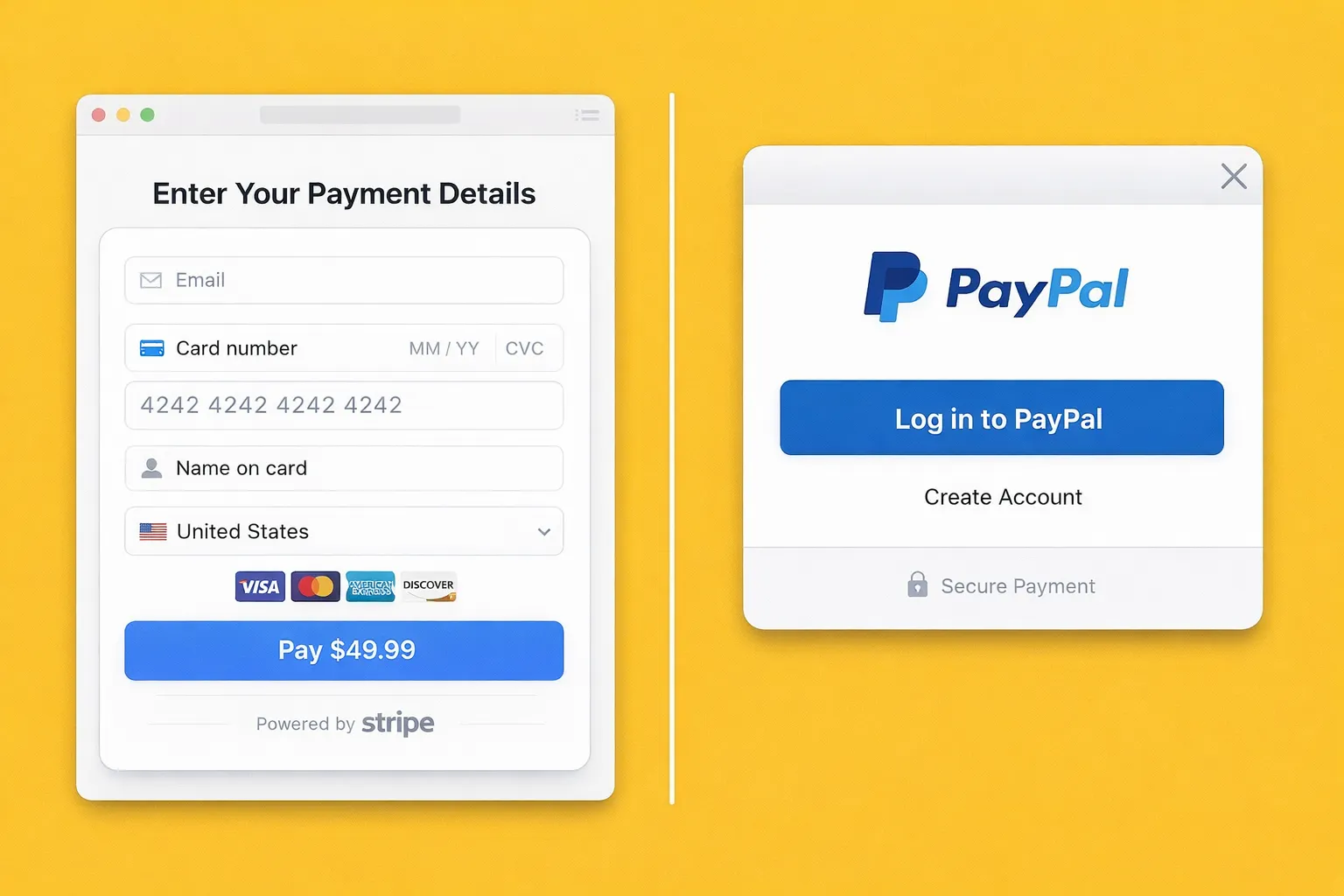
Stripe is fully white-labeled at no extra cost:
- Customers never leave your website
- Complete control over checkout design
- Your branding throughout the entire payment flow
- No Stripe logo visible to customers
- Multiple checkout flows for different products
SaaS companies and membership sites choose Stripe for this white-label approach. Your checkout looks like part of your product, not a third-party payment page.
PayPal shows its branding:
- Standard checkout redirects to PayPal pages
- PayPal logo always visible
- PayPal's Advanced Checkout exists but requires complex implementation.
- Payments Pro ($30/month) offers better customization but still shows PayPal branding
The Verdict on Setup & Flexibility
Stripe offers more payment options, white-label checkout, and Link's 100M+ customer network. Complete customization is free, saving you $360/year compared to PayPal's Payments Pro.
PayPal wins on setup speed and existing trust. With 430 million account holders and 15-minute setup, PayPal provides instant credibility for businesses that value speed over customization.
Security, Trust & Customer Support: Stripe vs PayPal
Security & Compliance
Both Stripe and PayPal are PCI DSS Level 1 compliant, the highest security certification. Both platforms protect your customer data equally.
Stripe's security:
- Stripe.js keeps card data off your server (automatic PCI compliance)
- Radar machine learning included free for basic fraud detection
- Radar for Fraud Teams ($0.02-$0.05 per transaction) adds custom fraud rules
- 3D Secure 2.0 support
- Chargeback protection available (0.4% extra)
PayPal's security:
- Buyer and Seller Protection Programs
- Basic fraud detection included
- PayPal charges for Advanced Fraud Protection ($10/month + $0.05 per transaction).
- Dispute resolution center
Both are secure. Stripe includes AI fraud protection free, while PayPal charges extra for advanced features.
Brand Trust
PayPal dominates here. With 430 million accounts, customers already trust it. Studies show offering PayPal increases conversion rates by 54%.
Customers rarely see Stripe's white-labeled system. While this maintains your brand, some customers hesitate entering cards on unfamiliar sites. Stripe powers Amazon and Shopify, building credibility rapidly.
Data Portability
This is a critical difference if you ever want to switch processors.
Stripe is a member of the Data Portability Cooperation. They'll help you export encrypted credit card data to another PCI-compliant processor like Braintree or Adyen. You own your customer relationships and can move them.
PayPal blocks card data export. If you switch, every single customer must re-enter their payment information. Subscription businesses lose 20-30% of customers during migration due to this vendor lock-in.
Customer Support
Stripe:
- 24/7 phone and live chat (requires login)
- Comprehensive documentation
- Active developer community
- Common complaint: Long wait times
PayPal:
- AI chatbot first, then human support
- Phone: Monday-Friday, 8am-8pm CT
- Email and limited live chat
- Common feedback: AI chatbot frustrating, but human support is faster when reached
The Verdict
Both platforms are equally secure. Stripe includes free AI fraud protection, while PayPal charges for advanced features. Stripe's data portability is crucial for long-term flexibility.
PayPal's brand trust directly increases conversions. For support, Stripe offers 24/7 access but PayPal often resolves issues faster once you reach a human.
The Final Verdict: Which Should You Choose?
For most online businesses, Stripe is the better choice. You'll save thousands annually on transaction fees, get free subscription billing, and maintain complete control over your checkout experience. Businesses processing $50,000 monthly save $5,820 per year with Stripe.
Choose Stripe if you:
- Run a SaaS or subscription business
- Process high volumes or have low-ticket products
- Want to own your brand experience with white-label checkout
- Need advanced payment methods and developer tools
- Value data portability and long-term flexibility
Choose PayPal if you:
- Need to launch in 15 minutes with zero technical setup
- Target customers who strongly prefer PayPal checkout
- Want to leverage 430 million existing account holders
- Prioritize instant brand recognition over customization
- Operate primarily in the U.S. with mainstream customers
The reality? Many successful businesses use both platforms together. PayPal's proven 54% conversion boost adds value. Use Stripe for your primary checkout to save on fees.
Building a subscription business? Outseta integrates with Stripe to handle all your billing logic, member authentication, and CRM. One platform, lower costs, complete control.
Ready to start? Choose the platform that matches your priorities. Your payment processor should support your growth, not slow it down.
Try Outseta free for 7 days—you'll have access to every feature. Cancel any time.

On this page
Get our newsletter